Cracked tablet screens are more common than you might think and they cause headaches for students, professionals, and families alike. In fact, screen issues account for about 17 percent of all tablet repairs according to repair industry research. Most people rush to replace their device or fumble with DIY fixes and miss an unexpected truth. Professional screen repair is not only cheaper than buying a new tablet but it preserves your device’s best performance and value in the long run.
Table of Contents
- What Is Tablet Screen Repair And Why Is It Important?
- Understanding The Anatomy Of Tablet Screens
- Common Issues: Why Tablet Screens Break
- The Repair Process: How Tablet Screens Are Fixed
- Finding Reliable Repair Services In Oklahoma City
Quick Summary
| Takeaway | Explanation |
|---|---|
| Professional repair extends device lifespan. | Expert technicians diagnose and fix issues effectively, helping tablets function longer. |
| Screen damage types need specific repairs. | Understanding types like cracks or unresponsiveness ensures the right repair approach is used. |
| Procrastination leads to bigger issues. | Early intervention prevents minor damage from escalating to complete screen failure. |
| Choose certified repair technicians. | Opt for repair services with trained professionals to ensure high-quality restoration. |
| Invest in quality replacement parts. | Quality components protect the tablet’s functionality and maintain its original performance. |
What is Tablet Screen Repair and Why is it Important?
Tablet screen repair is a specialized technical service focused on diagnosing, fixing, and restoring damaged touchscreen displays on various tablet devices. When your tablet screen develops cracks, becomes unresponsive, or experiences visual distortions, professional repair becomes crucial to maintain device functionality and extend its usable lifespan.
The table below summarizes the primary types of tablet screen damage and what characterizes each one to help identify repair needs more easily.
| Type of Screen Damage | Description |
|---|---|
| Hairline Cracks | Thin cracks that may spread gradually across the screen |
| Complete Shattered Glass | Extensive breakage covering most or all of the screen |
| Touch Sensitivity Malfunction | Areas where the screen fails to respond to touch |
| Pixel Discoloration/Dead Zones | Spots or lines with abnormal colors or nonfunctional pixels |
| Unresponsive Touch Areas | Entire sections of the screen with no touch response |
Understanding Screen Damage Types
Screen damage can manifest in multiple forms, each requiring a specific repair approach. Our guide on iPad screen repair provides deeper insights into identifying these issues. Common tablet screen problems include:
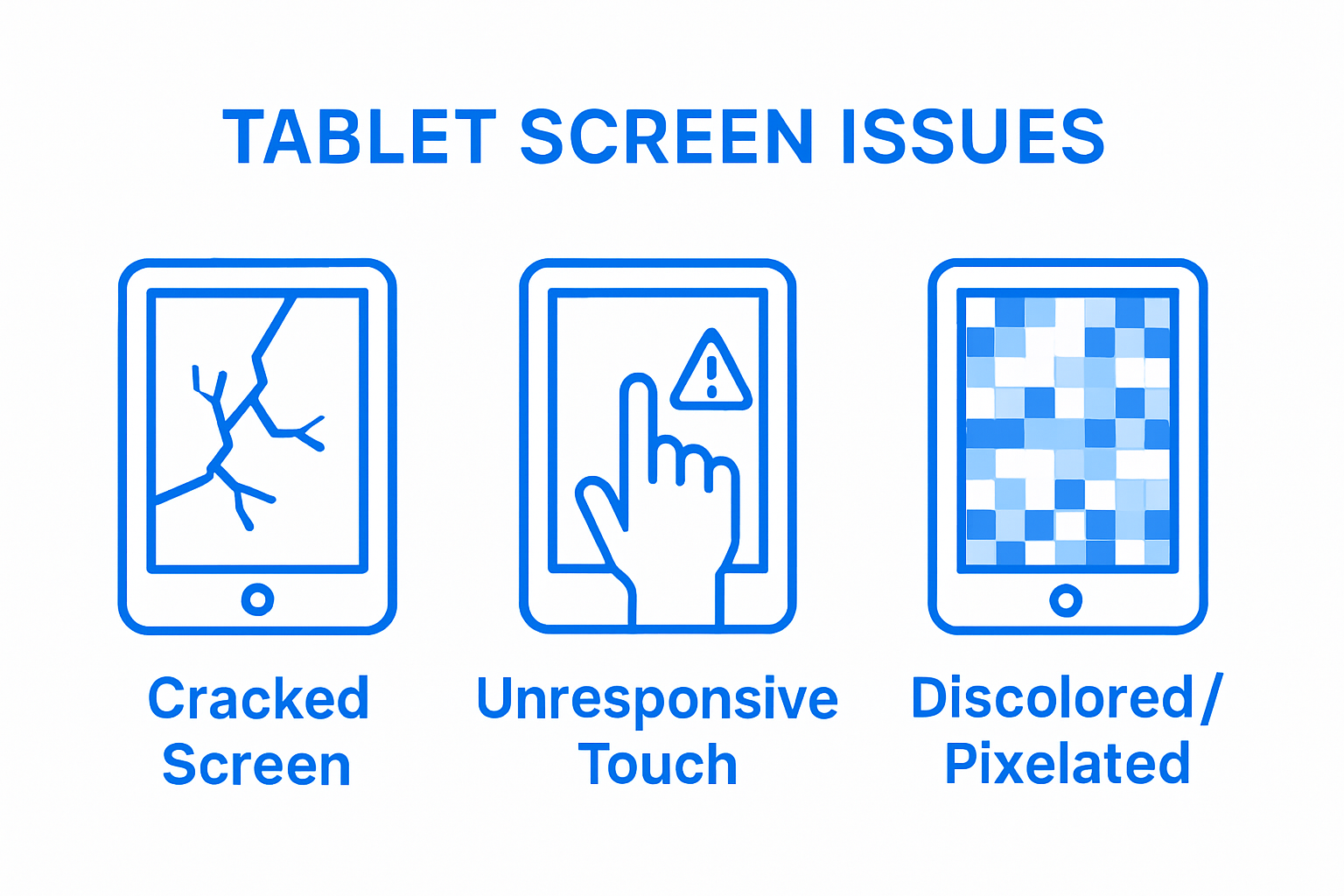
- Hairline cracks that spread gradually
- Complete shattered glass surfaces
- Touch sensitivity malfunctions
- Pixel discoloration or dead zones
- Unresponsive touch areas
According to research from the Open Repair Alliance, screen issues account for approximately 17% of tablet repair challenges, underscoring the importance of professional intervention.
Why Professional Repair Matters
Professional tablet screen repair offers significant advantages over DIY attempts or device replacement.
Expert technicians understand the intricate layering of modern touchscreens, which typically include multiple components: protective glass, digitizer, LCD panel, and intricate electronic connections.
Repairing a tablet screen professionally ensures:
- Precise diagnostic assessment of underlying issues
- Preservation of device warranty where possible
- Use of high-quality replacement components
- Comprehensive restoration of screen functionality
- Cost-effective alternative to full device replacement
Technological advancements have made tablets critical tools in educational, professional, and personal environments. Maintaining their functionality through professional screen repair represents a smart, economical approach to device management.
Understanding the Anatomy of Tablet Screens
Tablet screens represent complex technological systems composed of multiple intricate layers working seamlessly together to deliver visual and interactive experiences. Understanding their structural composition is crucial for effective repair and maintenance.
Screen Layer Composition
A typical tablet screen comprises several sophisticated components that function interdependently. Our guide on iPad screen repair provides additional context on screen mechanics. The primary layers include:
This table outlines the main layers that make up a typical tablet screen and briefly explains the function of each to provide insight into screen anatomy.
| Screen Layer | Function |
|---|---|
| Protective Glass Layer | Shields underlying components from scratches and impacts |
| Digitizer Layer | Detects and translates touch input into digital signals |
| LCD Panel | Presents visual content, color, and brightness |
| Electronic Connection Matrix | Links screen layers and ensures coordination among components |
- Protective Glass Layer: Tempered glass designed to resist scratches and minor impacts
- Digitizer Layer: Translates physical touch into digital signals
- LCD Panel: Displays visual content with color and brightness
- Electronic Connection Matrix: Enables communication between screen components
According to research analyzing tablet screen structural vulnerabilities, these layers are interconnected through microscopic electronic pathways that can be easily disrupted during damage.
Screen Interaction Mechanisms
Modern tablet screens utilize capacitive touch technology, which relies on detecting electrical conductivity from human fingers. This sophisticated system allows precise tracking of touch movements, gestures, and pressure sensitivity. The digitizer layer plays a critical role in translating physical interactions into digital commands, interpreting complex multi touch gestures with remarkable accuracy.
The screen’s ability to respond instantly and accurately depends on the seamless integration of these technological layers. Minor disruptions in any component can significantly impact overall screen performance, making professional repair essential for maintaining optimal functionality.

Common Issues: Why Tablet Screens Break
Tablet screens are vulnerable to multiple damage mechanisms that can compromise their structural integrity and functionality. Understanding these potential sources of damage helps users take proactive protective measures and recognize when professional repair becomes necessary.
Physical Impact Damage
Read our comprehensive guide on iPad repair for detailed insights into screen vulnerabilities. Physical impacts represent the most common cause of tablet screen damage, occurring through various scenarios:
- Accidental drops from tables or chairs
- Impacts during transportation
- Pressure from sitting or placing heavy objects on tablets
- Rough handling by children or inexperienced users
- Collisions during active movement
The tempered glass used in tablet screens, while designed for durability, has inherent structural limitations that make it susceptible to fracturing under sudden mechanical stress.
Environmental and Structural Vulnerabilities
According to scientific research examining tablet damage processes, environmental factors significantly contribute to screen degradation. Temperature fluctuations, humidity, and repeated mechanical stress can create microscopic weaknesses in the screen’s structural composition.
Critical factors affecting screen durability include:
- Manufacturing quality of the screen components
- Frequency and intensity of device usage
- Storage and transportation conditions
- Material fatigue over time
- Exposure to extreme environmental conditions
The complex layered structure of modern tablet screens means that even minor damage can propagate quickly, transforming small cracks into extensive screen failure. Professional assessment becomes crucial in preventing complete screen breakdown and preserving device functionality.
The table below compares reasons why tablet screens break, distinguishing between physical impact factors and environmental/structural vulnerabilities highlighted in the article.
| Cause Category | Example Factors |
|---|---|
| Physical Impact Damage | Drops, transportation impacts, pressure from heavy objects, rough handling |
| Environmental/Structural Factors | Changes in temperature, humidity, material fatigue, manufacturing quality, storage, and use conditions |
The Repair Process: How Tablet Screens are Fixed
Tablet screen repair is a sophisticated technical procedure requiring precision, specialized tools, and deep understanding of complex electronic systems. Professional repair involves multiple intricate steps designed to restore device functionality while preserving its original performance characteristics.
Diagnostic Assessment
Our guide on laptop screen repair offers additional context on technical evaluation processes. Before any repair intervention, technicians conduct comprehensive diagnostic assessments to determine the exact nature and extent of screen damage:
- Visual inspection of surface damage
- Electronic connectivity testing
- Touch responsiveness evaluation
- Internal component structural analysis
- Precise mapping of damage location and type
According to research analyzing repair methodologies, successful screen repair depends critically on accurate initial diagnostic procedures.
Repair and Replacement Techniques
Modern tablet screen repair employs advanced techniques that minimize device disruption. Repair strategies vary based on damage complexity, ranging from minor touch recalibration to complete screen module replacement. Professional technicians utilize specialized tools and techniques such as:
- Precision heat-controlled adhesive removal
- Microscopic electronic pathway reconnection
- Exact component matching
- Static-free workspace environments
- Advanced bonding and sealing technologies
The intricate nature of tablet screen repair demands extensive technical knowledge and specialized equipment. Each repair represents a delicate balance between preserving original device integrity and implementing necessary technological interventions to restore full functionality.
This table summarizes the key steps involved in the professional tablet screen repair process, helping readers understand what each stage entails.
| Repair Stage | Description |
|---|---|
| Diagnostic Assessment | Visual inspection, testing touch response, mapping damage, and assessing internal components |
| Repair & Replacement | Removing damaged layers, matching components, reconnecting electronics, bonding/sealing |
| Post-Repair Testing | Ensuring restored functionality and verifying performance before returning to the user |
Finding Reliable Repair Services in Oklahoma City
Selecting a trustworthy tablet screen repair service requires careful consideration and understanding of key evaluation criteria. Professional repair centers must demonstrate technical expertise, transparency, and commitment to high quality service to earn customer confidence.
Evaluating Repair Service Credentials
Our comprehensive repair services guide helps customers understand what to look for when choosing a repair center. Critical factors for identifying reliable tablet repair services include:
- Certified technician qualifications
- Verifiable professional experience
- Transparent pricing structures
- Comprehensive diagnostic capabilities
- Clear warranty and guarantee policies
According to research analyzing repair service effectiveness, successful repairs depend significantly on the technical knowledge and precision of service providers.
Essential Service Verification Criteria
Customers should conduct thorough assessments before entrusting their devices to any repair service. Key verification steps involve investigating the repair center’s reputation through multiple channels:
- Detailed online customer reviews
- Professional certifications
- Years of operational experience
- Range of supported device models
- Quality of replacement component sourcing
- Turnaround time for repairs
- Post repair support and follow up services
The complexity of modern tablet screen repairs demands specialized skills and advanced technical understanding. Selecting a repair service is not merely about finding the lowest price, but identifying professionals who can effectively restore device functionality while preserving its original performance characteristics.
The following table outlines essential criteria for evaluating and selecting a reliable tablet screen repair service, as described in the article.
| Evaluation Criteria | Explanation |
|---|---|
| Technician Certification | Evidence of professional training and qualifications |
| Service Experience | Years in business and range of supported devices |
| Transparent Pricing | Clear estimates and explanation of costs |
| Diagnostic Capabilities | Comprehensive device assessment prior to repair |
| Warranty & Guarantee Policies | Post-repair support and satisfaction guarantees |
| Replacement Part Quality | Use of high-quality, compatible components |
| Customer Reviews | Reputation based on online feedback and client experiences |
Restore Your Tablet’s Touch and Clarity with Local Experts
If you are struggling with a cracked, unresponsive, or malfunctioning tablet screen, you already know how frustrating it is when touch sensitivity fails or visual distortions interfere with your everyday tasks. This article explained just how complex screen repairs can be, from dealing with shattered glass to restoring the delicate digital layers that bring your device back to life. Reliable, professional service saves you from extra headaches, ensuring accurate diagnostics, warranty protection, and cost-effective results. See more about our expertise on the Uncategorized category, where we address real tablet repair challenges just like yours.

Ready for a smooth and affordable solution? Choose Dash Repairs today for quick turnaround, trusted repairs, and a commitment to quality across all tablet models. Visit Dash Repairs now to schedule your screen repair or explore our full range of services. Don’t let a damaged screen slow you down. Get your device back in top shape—contact us and experience the difference local repair expertise makes.
Frequently Asked Questions
What are the common types of tablet screen damage?
Common types of tablet screen damage include hairline cracks, complete shattering, touch sensitivity malfunctions, pixel discoloration or dead zones, and unresponsive touch areas.
Why is professional tablet screen repair preferred over DIY fixes?
Professional tablet screen repair ensures a precise diagnostic assessment, the use of high-quality replacement components, and comprehensive restoration of functionality, ultimately preserving the device’s warranty and lifespan.
What steps are involved in the tablet screen repair process?
The tablet screen repair process includes a diagnostic assessment, repair and replacement techniques, and testing of the screen’s functionality to ensure everything is working as intended after repairs.
How can I protect my tablet screen from damage?
To protect your tablet screen, consider using a quality screen protector, utilizing a sturdy case, avoiding placing heavy objects on the screen, and being cautious during transportation.
Recommended
- When to Repair your iPad Screen | Dash Cellular Repair | Cell Phone, iPhone, Laptop Repair in Oklahoma
- Broken Laptop Screen, What do I do? | Dash Cellular Repair | Cell Phone, iPhone, Laptop Repair in Oklahoma
- Need iPad Repair in Oklahoma City | Dash Cellular Repair
- Uncategorized | Dash Cellular Repair | Cell Phone, iPhone, Laptop Repair in Oklahoma