Did you know that over 50 percent of smartphone users have experienced cracked screens or malfunctioning components within the past year? Everyday accidents, battery wear, water exposure, and software glitches can leave your device struggling or unusable. With mobile devices playing such a vital role in daily life, knowing how to handle common issues and when to seek professional help can protect your investment and keep you connected.
Quick Summary
| Takeaway | Explanation |
|---|---|
| 1. Immediate screen repairs are essential | Quickly fixing a cracked screen prevents further damage and maintains functionality. |
| 2. Professional repairs save money long-term | Hiring experts for repairs can be more cost-effective than buying a new device. |
| 3. Monitor battery health closely | Signs of battery failure, like rapid drain, indicate the need for replacement. |
| 4. Act quickly after water exposure | Quickly powering off and drying your device can prevent extensive damage. |
| 5. Regular backups protect your data | Use cloud services and multiple copies to safeguard against data loss. |
Table of Contents
- Cracked Screen Repair And Display Replacement
- Battery Replacement For Extended Device Life
- Water Damage Assessment And Recovery Steps
- Charging Port And Power Button Fixes
- Camera, Speaker, And Microphone Repairs
- Data Recovery And Backup Solutions
- Device Unlocking And Software Troubleshooting
1. Cracked Screen Repair and Display Replacement
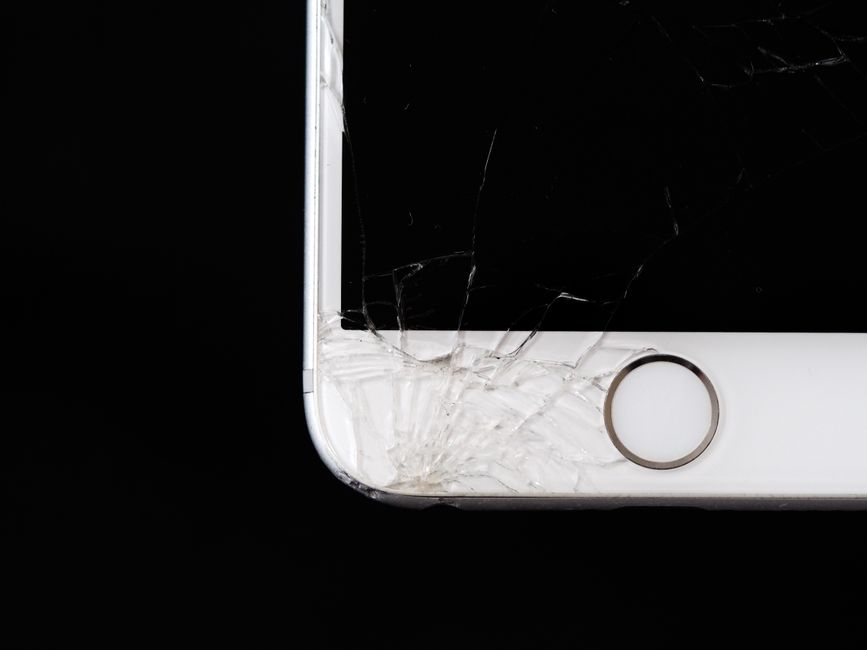
A cracked smartphone screen is more than just an aesthetic nuisance it can significantly compromise your device’s functionality and long term durability. Whether from an accidental drop, unexpected impact, or everyday wear and tear, screen damage happens to almost every smartphone user at some point.
Screen repairs are critical because a damaged display can lead to multiple problems. Tiny cracks can quickly spread, rendering your touchscreen unresponsive or creating sharp edges that risk cutting your fingers. The internal components beneath the screen can also become exposed to dust, moisture, and additional physical stress.
What You Need to Know About Screen Repairs:
- Immediate repairs prevent further damage
- Professional replacements maintain device functionality
- DIY repairs often void manufacturer warranties
When it comes to screen replacement, you have two primary options. Professional repair services can replace your screen quickly and efficiently, typically within an hour. These experts use specialized tools and genuine replacement parts that match your specific device model. read more about the screen replacement process to understand what exactly happens during a professional repair.
The cost of screen repair varies depending on your device model and extent of damage. Modern smartphones with advanced display technologies like OLED or AMOLED screens tend to be more expensive to replace. However, professional repair remains significantly cheaper than purchasing an entirely new device.
Pro Tip: Always check your device warranty and insurance options before proceeding with any screen repair. Some manufacturers and carriers offer coverage that could save you money on replacement costs.
Protecting your screen after repair is equally important. Consider investing in high quality tempered glass screen protectors and robust phone cases that provide multi layer protection against future impacts. A small investment in prevention can save you from costly repairs down the line.
2. Battery Replacement for Extended Device Life
Your smartphone battery is the heartbeat of your device determining how long you can stay connected and productive before needing a recharge. Over time batteries naturally degrade losing their ability to hold charge and perform at peak efficiency.
Battery degradation happens through multiple factors including temperature exposure frequency of charging and overall usage patterns. Most lithium ion batteries start showing significant performance drops after 18 to 24 months of regular use. When your device starts experiencing rapid battery drain unexpected shutdowns or takes longer to charge these are clear indicators that a battery replacement might be necessary.
Warning Signs of Battery Failure:
- Phone dies quickly even after full charge
- Device gets unusually hot during charging
- Battery percentage drops erratically
- Charging cable connection becomes unreliable
Professional battery replacement offers numerous advantages over DIY attempts. Certified technicians can quickly swap out your old battery with an original manufacturer part ensuring optimal performance and device safety. learn about affordable device repair methods that can help you extend your smartphone’s lifespan without breaking the bank.
Practical Battery Maintenance Tips:
- Avoid extreme temperature environments
- Keep battery charge between 20% and 80%
- Use original manufacturer chargers
- Update device software regularly
The cost of battery replacement varies depending on your device model but typically ranges from 50 to 120 dollars. This investment is significantly cheaper than purchasing an entirely new smartphone and can extend your device’s functional life by another 18 to 24 months.
Choosing professional repair services ensures your device receives proper treatment. Certified technicians use specialized tools and follow manufacturer guidelines during battery replacement minimizing risks associated with amateur repairs. Remember that attempting to replace batteries yourself can potentially damage internal components and void existing warranties.
3. Water Damage Assessment and Recovery Steps
Water damage remains one of the most common and devastating accidents for electronic devices. Whether from an accidental spill, unexpected rain, or dropping your phone near water these incidents can quickly transform a functional device into an expensive paperweight.
Immediate action is crucial when liquid exposure occurs. The first few minutes after water contact can dramatically impact whether your device survives or becomes permanently damaged. Electronic components are extremely sensitive to moisture and corrosion can begin within hours of liquid exposure.
Urgent First Response Steps:
- Power off device immediately
- Remove battery if possible
- Do not attempt to charge the device
- Keep device in dry environment
Contrary to popular myths rice is not an effective moisture removal method. Professional water damage recovery requires specialized techniques and precision equipment. discover practical device repair methods that can help salvage your water damaged device safely and effectively.
Professional Water Damage Assessment Includes:
- Comprehensive internal component inspection
- Moisture mapping of device circuits
- Targeted corrosion prevention
- Ultrasonic cleaning techniques
The complexity of water damage repair varies based on liquid type and exposure duration. Saltwater and sugary liquids cause more severe damage compared to clean water. Chlorinated or mineral rich water can leave permanent residue that corrodes internal components.
Professional technicians use advanced diagnostic tools to determine precise damage extent. They can often recover data and restore functionality even in seemingly hopeless scenarios. Repair costs typically range from 75 to 250 dollars depending on device model and damage severity.
Preventive measures are always better than reactive repairs. Waterproof cases phone insurance and careful handling can save you significant money and stress. Remember that most manufacturer warranties do not cover water damage making professional repair your best recovery option.
4. Charging Port and Power Button Fixes
Two critical components that can make or break your device’s usability are the charging port and power button. These small yet essential parts experience constant daily stress and are prone to wear and damage that can render your entire device unusable.
Charging ports suffer from multiple issues including debris accumulation connector damage and bent internal pins. Dust lint and pocket debris gradually build up restricting electrical connections and preventing proper charging. Power buttons face similar challenges with mechanical wear reduced responsiveness and potential internal circuit damage.
Common Charging Port Problems:
- Loose connection during charging
- Device not recognizing charging cable
- Intermittent power supply
- Physical damage to port metal contacts
Professional repair becomes crucial when basic troubleshooting fails. Clean cable connections and gentle port cleaning can resolve minor issues. However structural damage requires specialized technical intervention. read more about charging port repair techniques to understand the intricate process of restoring your device’s power connectivity.
Power Button Repair Warning Signs:
- Unresponsive or sticky button
- Difficulty turning device on or off
- Buttons feeling loose or wobbly
- Inconsistent mechanical response
The cost of professional charging port and power button repairs typically ranges from 50 to 150 dollars depending on device model and specific damage extent. While this might seem expensive replacement is significantly more costly than targeted repairs.
Technicians use precision tools to diagnose and resolve these issues. They can clean microscopic debris replace worn connectors and restore mechanical switch functionality. Advanced diagnostic equipment allows them to identify underlying problems that might not be immediately visible.
Preventive maintenance remains key. Using high quality cables keeping ports clean and avoiding extreme physical stress can dramatically extend your device’s functional life. Investing in professional repair protects your device and saves money in the long term.
5. Camera, Speaker, and Microphone Repairs
Your smartphone’s sensory components like cameras, speakers, and microphones are complex systems that can malfunction due to physical damage, software issues, or accumulated debris. When these critical communication tools stop working properly your entire device experience becomes compromised.
Camera problems manifest in multiple ways ranging from blurry images and lens obstructions to complete sensor failures. Speakers might produce distorted sound crackling audio or sudden volume drops. Microphone issues can result in poor call quality or complete audio input failure during recordings and calls.
Common Camera Failure Indicators:
- Blurry or unfocused images
- Camera app crashes unexpectedly
- Black screen during camera use
- Physical lens damage or scratches
Professional repair technicians use specialized diagnostic tools to identify precise problems with these intricate components. explore common phone repair techniques to understand the complexity of resolving sensory component issues.
Speaker and Microphone Warning Signs:
- Distorted or muffled sound output
- Inability to record clear audio
- Inconsistent volume levels
- No sound during calls or media playback
Repair costs for these components typically range from 75 to 250 dollars depending on device model and specific damage. Factors like water exposure physical impact and internal dust accumulation can significantly complicate repair processes. Professional technicians can often restore functionality without complete component replacement.
Preventive maintenance plays a crucial role in protecting these sensitive parts. Using protective cases avoiding extreme environments and keeping device ports clean can dramatically reduce the likelihood of sensory component damage. Regular software updates and gentle handling also contribute to maintaining optimal device performance.
6. Data Recovery and Backup Solutions
Data loss can happen in an instant destroying precious memories important documents and critical personal information. Whether through accidental deletion device failure or unexpected hardware damage the risk of losing your digital life is always present.
Modern smartphones store immense amounts of personal data including photos messages contacts financial information and work documents. A single technical malfunction can potentially erase years of accumulated digital memories and critical information. Professional data recovery services offer a lifeline in these challenging scenarios.
Common Data Loss Scenarios:
- Accidental factory reset
- Physical device damage
- Water exposure
- Corrupted storage systems
- Malware attacks
Professional data recovery involves sophisticated techniques that go beyond simple file retrieval. Technicians use specialized software and hardware tools to reconstruct data from damaged storage systems. learn about practical device repair methods that can help protect and recover your valuable digital information.
Effective Backup Strategies:
- Use cloud storage services
- Implement automatic backup schedules
- Maintain multiple backup locations
- Encrypt sensitive information
- Regularly verify backup integrity
Data recovery costs can range from 100 to 500 dollars depending on damage complexity and storage type. The price might seem high but represents a fraction of the potential value of recovered personal and professional data. Success rates vary from 70% to 90% based on damage extent and how quickly professional intervention occurs.
Preventive measures remain the best protection against data loss. Regular backups cloud synchronization and careful device handling can minimize risks. Professional services recommend creating multiple backup copies across different platforms to ensure maximum data safety. Remember that no single backup solution is foolproof diversification is key to comprehensive data protection.
7. Device Unlocking and Software Troubleshooting
Software issues can transform your once smooth running smartphone into a frustrating brick of technology. Device unlocking and software troubleshooting represent critical skills that can save you time money and potential device replacement.
Modern smartphones are complex machines running intricate operating systems vulnerable to multiple software related problems. These can range from simple app crashes to more severe system wide malfunctions that prevent normal device functionality. Unlocking a device involves removing carrier restrictions allowing greater flexibility in network usage and device management.
Common Software Malfunction Symptoms:
- Frequent app crashes
- Slow performance
- Unresponsive touchscreen
- Battery draining quickly
- Unexpected system restarts
Professional software troubleshooting goes beyond basic reset techniques. Technicians can diagnose deep system issues perform advanced firmware repairs and restore device performance without data loss. explore practical device repair techniques to understand the intricate process of resolving complex software problems.
Device Unlocking Benefits:
- Use SIM cards from different carriers
- Increase device resale value
- Remove carrier bloatware
- Enable international mobile usage
- Customize device settings
Unlocking services typically cost between 20 to 100 dollars depending on device model and carrier restrictions. The process requires specialized knowledge to navigate carrier specific protocols and avoid potential legal complications. Professional technicians understand the nuanced technical requirements for safe and legal device unlocking.
Software troubleshooting involves multiple strategies including system updates firmware restoration selective app removal and comprehensive diagnostic scanning. These techniques can resolve performance issues restore device stability and extend overall device lifespan. Always backup critical data before attempting major software interventions to prevent potential information loss.
Below is a comprehensive table summarizing the main device repair and maintenance strategies discussed throughout the article.
| Repair Type | Key Points & Actions | Benefits/Outcomes |
|---|---|---|
| Screen Repair | Immediate repairs prevent further damage; Professional services use genuine parts | Maintains device functionality; Cheaper than buying a new device |
| Battery Replacement | Signs include rapid drain, overheating; Professionals use original parts | Extends device life by 18-24 months; Ensures optimal performance |
| Water Damage Recovery | Power off, remove battery; Professional assessment for moisture mapping | Can salvage data and functionality; Avoids permanent damage |
| Charging Port & Power Button Fixes | Watch for loose connections and unresponsive buttons; Specialized cleaning and repair | Restores power and usability; Targets specific issues efficiently |
| Camera, Speaker, Microphone Repairs | Blurry images, distorted sound as signs; Diagnostics to pinpoint issues | Restores quality and function; Extends component life |
| Data Recovery & Backup | Use of cloud storage and regular backups; Professional recovery in data loss cases | Protects valuable data; High recovery success rates |
| Software Troubleshooting | Frequent crashes and slow performance as signs; Professional firmware repairs | Restores functionality; Allows for device unlocking |
Get Your Device Fixed the Right Way—Fast, Affordable, and Reliable
You just read about the most common device issues: cracked screens, fading batteries, water damage, and sudden data loss. Each of these problems can cause frustration or take your device out of commission completely. When the touchscreen stops responding, the battery drains quickly, or your phone gets wet, you want a solution that is not only effective but also trustworthy. That is why so many local customers turn to Dash Cellular Repair for expert help tailored to your needs.

Why risk making these issues worse with DIY fixes or unreliable service? At Dash Repairs, you get certified technicians, original parts, and real warranties. We offer quick turnaround on everything from phone screen repair to battery replacement and advanced data recovery. Do not let a broken device disrupt your day. Start your repair now and see for yourself why we are Oklahoma’s trusted choice for fast and affordable phone and tablet repairs. Your problem can be solved today—book your service with us before it gets worse.
Frequently Asked Questions
What are the key signs that my smartphone screen needs repair?
A cracked or unresponsive smartphone screen is a primary indicator that it needs repair. If you notice visible cracks, touch issues, or sharp edges, schedule a professional replacement to avoid further damage.
How can I prevent battery issues in my smartphone?
To prevent battery issues, maintain your battery charge between 20% and 80% and avoid extreme temperatures. Regularly check for unusual battery drain or heating during charging, and if issues arise, consider professional battery replacement.
What should I do immediately after my smartphone gets wet?
Immediately power off your device, remove the battery if possible, and do not attempt to charge it. Place the phone in a dry environment to minimize moisture damage; seeking professional water damage assessment will increase your chances of recovery.
How can I extend the life of my charging port and power button?
Keep your charging port clean by regularly removing debris and avoiding excessive physical stress. If you notice any connectivity issues or unresponsive buttons, consult a technician for professional repair to prevent further damage.
What are effective strategies for preventing data loss on my smartphone?
Implement regular cloud backups and maintain multiple backup locations to secure your data. Schedule backups weekly and verify their integrity to ensure you can recover crucial information quickly in case of data loss.
How can I unlock my smartphone safely and legally?
To unlock your smartphone safely, consider hiring a professional technician who understands your device’s specific carrier protocols. This ensures you avoid potential legal complications while allowing you to use SIM cards from different carriers.
Recommended
- 7 Affordable Device Repair Methods You Should Know | Dash Cellular Repair | Cell Phone, iPhone, Laptop Repair in Oklahoma
- 7 Most Common Phone Repairs You Need to Know | Dash Cellular Repair | Cell Phone, iPhone, Laptop Repair in Oklahoma
- blog | Dash Cellular Repair | Cell Phone, iPhone, Laptop Repair in Oklahoma
- What is Device Repair? Understanding Your Options | Dash Cellular Repair | Cell Phone, iPhone, Laptop Repair in Oklahoma